Photo to Rap Video Maker
Go from photo to rap video with AI — solo, with a friend or with your pet. Try one free 5-second preview per account.
Create your photo to rap video
Pick the meme
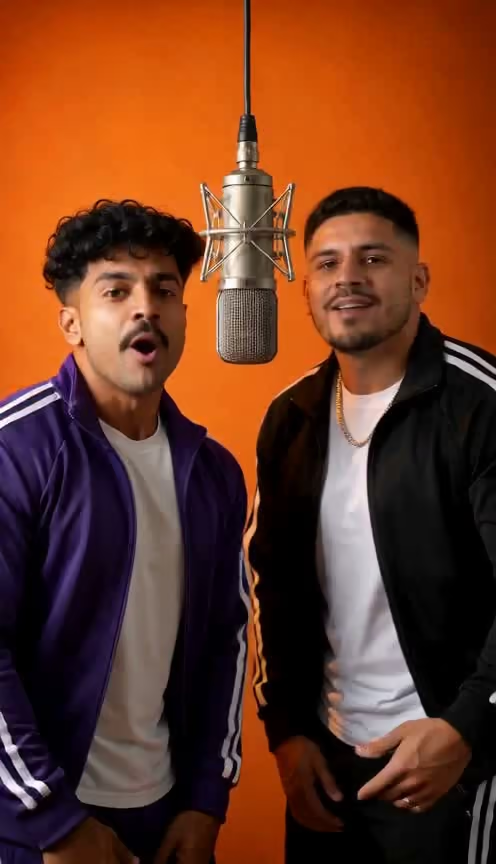
The two of you shoulder to shoulder in the orange booth, one hanging mic.
Add photos
0 of 2 ready
A clear, front lit face works best. JPG, PNG or WebP, up to 10 MB. No sign-in needed to add photos.
Free 5s preview first, no card. Full 15s video from $6.99.
Trending now
Rap trends and original rap stages
Remake a trend or create your own rap. Tap an example to start with your photos.


How it works
How to make a photo to rap video in 3 steps
- 01
Choose a template and add photos
Pick a solo, duo or pet scene, then upload the clear photos it needs.
- 02
Choose a free preview or full video
Try one free 5-second 480p preview per account, or make the full 15-second 720p video directly for 10 credits.
- 03
Download and share
Download your preview from My Videos. Paid full videos offer downloads with AI-generated sound or as a silent clip.
The basics
What is a photo to rap video?
A photo to rap video turns still photos into an AI-generated rap performance. Choose a template and upload the photos it needs. Try a free preview, or create a full clip directly.
- You put inOne clear photo, or one per person in the style.
- You getA 15s 720p clip starring you: vertical or landscape by template, with AI sound or a silent download.
- It is notA lyrics-only song generator or a full-length music-video studio.
Pricing
Free preview and full-video pricing
| What you get | Price |
|---|---|
| AI preview made from your photos: 5 seconds, 480p, small watermark | Free, once per account · no card |
| Full video: 15 seconds, 720p, vertical or landscape by template, with sound or silent download, no watermark | 10 credits per video |
| A render that fails | Credits back automatically |
| Purchased credits you haven't used | Refundable within 7 days |
Prices are in USD. Any applicable taxes are calculated and shown at checkout before you pay.
The $6.99 Single pack includes 10 credits, enough for one full video. One-time packs, no subscription; larger packs reduce the cost per video. See all packs →
Why RapAIVideos
Why make it with RapAIVideos
Create a rap video without filming
| What you need | How RapAIVideos works |
|---|---|
| Photos | Clear photos of the people or pets in your selected template |
| Filming | No camera setup or recorded performance needed |
| App | Create in your browser, with no app installation |
| Sound | AI-generated beat and vocals, or a silent download |
| Scene and moves | Set by your chosen template; generated details can vary |
Choose your scene
Pick a solo, duo or pet template. The generator shows its photo requirements and video format before you start.
Preview with your photos
The preview is generated from your uploaded photos so you can check how they appear. A full video is rendered separately, so details may differ.
Photo tips
Photos that work best
Bring as many people as the style has: one photo for Burning Bridges, two (or one of you both) for Hotel Lobby and the duo stages.
- Face the camera, with your whole face in view.
- Light in front of you: no sunglasses, masks or heavy filters.
- One person per photo, waist up. A selfie usually works.
- JPG, PNG or WebP, up to 10 MB. Wear what you want to be seen in.
House rules
What you can't make
Photo permissions and content limits
- Only people who agreed.Yourself, or adults who said yes to being in the video.
- No minors.Photos of anyone under 18 are refused.
- No celebrities or public figures.Not even as a parody.
- No famous songs in the file.Your download has its own original beat, never a trend's master audio.
What we store, how long, and how to delete it: see Privacy.
FAQ
Photo to rap video FAQs
Is the AI rap video generator free?
Each account gets one free 5-second 480p preview, with no card required. Full videos are paid. The $6.99 Single pack includes 10 credits, enough for one full video.
What photo size and aspect ratio should I use?
For individual photos, we recommend at least 768 pixels on the shorter side and a 2:3 or 3:4 portrait crop. Keep the face and upper body clear; for pets, keep the whole head and body visible. For a shared photo, a 3:2 or 4:3 landscape crop can fit both subjects comfortably. JPG, PNG or WebP, up to 10 MB. Individual photos must be at least 320 pixels on each side; shared photos must be at least 768 pixels on each side, with both faces large and clear. Your photo's crop does not determine the video's format; the selected template does.
Are videos vertical or landscape?
Choose a template in 9:16 vertical or 16:9 landscape. Hotel Lobby — You & your pet offers both: choose Vertical for 9:16 or Landscape for 16:9. Hotel Lobby — Friends and Pets and the Original rap stages use 9:16 vertical. Burning Bridges uses 16:9 landscape. The generator shows the selected template's format before you start.
How long does generation take?
Based on our recent tests, allow about 2–4 minutes for the free 5-second preview and around 6 minutes for a full 15-second 720p video. The full video is rendered separately after you unlock it. These are estimates; queue times and safety checks can make a render take longer.
Can I leave the page while my video is generating?
Yes. Once you see “Your request is saved”, generation runs on our servers and continues after you close the page. Return to My Videos with the same account to check progress and view the finished video.
What if my video stays pending for too long?
Refresh My Videos to check the latest status. Renders that have not finished after about 20 minutes time out during status checks. Credits spent on a failed or timed-out render return automatically; a failed free preview does not use your free-preview chance. If it still shows Rendering after that, contact support with the link to your video.
What is the difference between Original rap and Meme remake?
Original rap creates new AI lyrics, a beat and vocals on your chosen stage. Meme remake recreates a trend's scene and moves with AI-generated audio. The trend's original recording is not included in either download.
Can I download a silent version or add a trending song?
Yes. Your unlocked full video is available with AI-generated sound or as a silent MP4. To use the trend's original song, download the silent version, upload it to TikTok or Reels, and select the official trending sound available in that app's library when you post. The social app adds the song to your post.
Can I choose a different vocal or upload my own song?
Voices are generated automatically for each video. Selecting a specific vocal or uploading your own song is not currently supported.
Can I share the clip on TikTok, Reels, or Shorts?
You can download the MP4 and upload it under each platform’s rules, or use Share to open your phone’s share sheet.
Who can see my uploaded photos?
See Privacy for retention, processors, and deletion. We do not ask you to upload anyone without consent.